What is a Graphics Rasterizer?
Rasterization is the task of taking an image described in a vector graphics format (shapes) and converting it into a Raster image (a series of pixels, dots or lines, which, when displayed together, create the image which was represented via shapes) - Wikipedia
With a rasterizer software we can convert shapes, represented by some vertices, into a fully colored object painted on the screen pixel by pixel. The important part here is that we build the shape pixel by pixel and give each of those a color.
This process is done nowadays by the GPU (Graphics Processing Unit) and is the core of any graphics intensive programs like video games, or any real time rendering software.
The Graphics Pipeline
The process of converting 3D coordinates into colored 2D pixels into the screen is described by the “Graphics Pipeline”. The pipeline can be divided into two main parts. The first transforms the 3D coordinates into 2D coordinates and the second transforms the 2D coordinates into colored pixels.
Here is a high level graph of the pipeline:

This image shows all the steps that we need to follow to build a rasterizer in a high level.
The Rasterizer
The rasterizer that we want to build will have almost all the steps described by the previous pipeline but we will make some simplifications on the way to make our life easier.
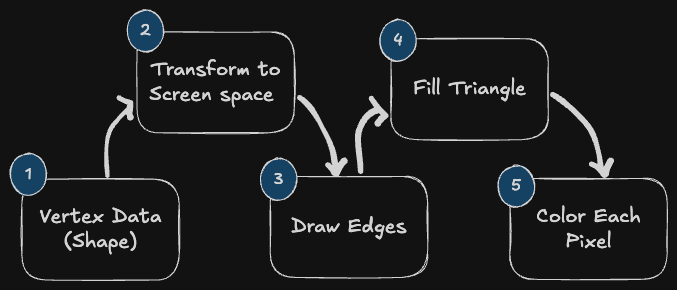
- Start with the vertex data.
- Transform the vertex data from local coordinates into the screen space coordinates.
- Draw the line between the vertices (Edges).
- Then we want to fill the triangle that is created by those vertices and edges.
- Finally, we want to give a color to each of the pixels and draw it to the pixels buffer that will painted on the window.