Parallel Processing
Currently, we process each vertex and shade each fragment one at a time. This is becomes very slow when dealing with many vertices. It explodes in complexity. Doing a small exercise of increasing the resolution of the window we can notice the slowness of the program. This is because we now need to process way more fragments between each vertex.
const int w = 800, h = 600, pixelSize = 1;
// const int w = 200, h = 150, pixelSize = 4;

gRenderer = Renderer_Create(w, h, pixelSize);
We want to replicate the parallel nature of how the GPU handles all this computations with great performance. The GPU is multi-threaded by design, it runs small programs in parallel to process all those vertices and fragments.
We can use a similar approach with the CPU. We can spin up multiple threads to process all the calculations. But the big question is how to divide the problem so that there is no dependency between the threads.
Tile-based Rendering
We found this idea of Tiled Rendering which divides the screen in a grid of tiles and each tile contains some triangles that will be processed. This is very useful because every sub-area of the screen is independent of the others and we can delegate the calculations of each tile to a thread.
The real performance benefit comes from splitting the fragments calculations in different tiles. So the vertex transformations and triangle creation stays that same but we split the part where we rasterize the triangles in different tiles.
// Rasterize Triangles Multi-Threat
// Render by tiles 32x32
const int tileSize = 32;
int tilesX = (r->width + tileSize - 1) / tileSize;
int tilesY = (r->height + tileSize - 1) / tileSize;

std::vector<std::thread> threads;
int numThreads = std::thread::hardware_concurrency();

for (int t = 0; t < numThreads; t++) {
    threads.emplace_back([&, t]() {
        for (int i = t; i < tilesX * tilesY; i += numThreads) {
            int tx = i % tilesX;
            int ty = i / tilesX;

            Renderer_RasterizeTile(r, triangles, tx, ty, tileSize);
        }
    });
}

for (auto &th : threads) {
    th.join();
}
Here we create 32x32 sized tiles and spin up multiple threads that will rasterize a single tile. Then we join the results of all the threads.
The Renderer_RasterizeTile function takes all the triangles and some boundaries of the tile to process the fragments.
void Renderer_RasterizeTile(Renderer *r, const std::vector<Triangle> &triangles,
                            int tileX, int tileY, int tileSize) {
    int x0 = tileX * tileSize;
    int y0 = tileY * tileSize;
    int x1 = std::min(x0 + tileSize, r->width);
    int y1 = std::min(y0 + tileSize, r->height);

    for (const auto &triangle : triangles) {
        // Triangle area (for barycentric coordinates)
        // Skip degenerate triangles
        if (std::abs(triangle.area) < 0.0001f) {
            return;
        }

        // Determine winding
        bool clockwise = triangle.area < 0;
        float invArea = 1.0f / triangle.area;

        // Process only triangles that intersect with the tile
        if (!TriangleIntersectsTile(triangle, x0, y0, x1, y1)) {
            continue;
        }

        // Rasterize only within tile bounds
        for (int y = y0; y < y1; y++) {
            for (int x = x0; x < x1; x++) {
                Vec2 p = {x + 0.5f, y + 0.5f};

                float w0 = TriangleEdgeFunction(triangle.v1.coords,
                                                triangle.v2.coords, p);
                float w1 = TriangleEdgeFunction(triangle.v2.coords,
                                                triangle.v0.coords, p);
                float w2 = TriangleEdgeFunction(triangle.v0.coords,
                                                triangle.v1.coords, p);

                // Check inside based on winding
                bool inside = clockwise ? (w0 <= 0 && w1 <= 0 && w2 <= 0)
                                        : (w0 >= 0 && w1 >= 0 && w2 >= 0);

                if (inside) {
                    float b0 = w0 * invArea;
                    float b1 = w1 * invArea;
                    float b2 = w2 * invArea;

                    Fragment frag =
                        TriangleInterpolatePoint(triangle, b0, b1, b2);
                    frag.coords = {p.x, p.y};

                    ColorRGBA fragColor =
                        Renderer_CalculateFragmentLighting(r, frag);
                    frag.color = fragColor;

                    Renderer_SetPixel(r, frag.coords.x, frag.coords.y, frag.z,
                                      ColorToInt(frag.color));
                }
            }
        }
    }
}

bool TriangleIntersectsTile(
    Triangle triangle, int tileX0, int tileY0,
    int tileX1, int tileY1) {

    return !(triangle.max.x < tileX0 ||
             triangle.min.x > tileX1 ||
             triangle.max.y < tileY0 ||
             triangle.min.y > tileY1);
}
The code looks very familiar. It is almost a copy from the Renderer_RasterizeTriangles function. The only difference here is that we only process triangles that intersect with the tile boundaries and we rasterize each triangle using the tile rectangle area. We think here we could only raster the triangle using its min and max points, and this will eliminate many useless calculations.
Another performance improvement here is to create a list of triangles that intersect each of the tiles upfront and then only iterate over those triangles that are inside the tile.
This speeds up the rendering process quite a bit.
Let us now render multiple cubes:
Vec3 position = Vec3{0.0f, 0.0f, 0.0f};
Vec3 rotation = Vec3{0.0f, 0.0f, 0.0f};
Vec3 scale = Vec3{1.0f, 1.0f, 1.0f};
ColorRGBA color = ColorRGBA{1.0f, 0.5f, 0.31f};
Renderer_DrawCube(&gRenderer, position, rotation, scale, color);

position = Vec3{-1.0f, 0.0f, 0.0f};
scale = Vec3{0.5f, 0.5f, 0.5f};
color = ColorRGBA{1.0f, 0.0f, 0.0f};
Renderer_DrawCube(&gRenderer, position, rotation, scale, color);

position = Vec3{1.0f, 0.0f, 0.0f};
scale = Vec3{0.5f, 0.5f, 0.5f};
color = ColorRGBA{0.0f, 1.0f, 0.0f};
Renderer_DrawCube(&gRenderer, position, rotation, scale, color);

position = Vec3{0.0f, 1.0f, 0.0f};
scale = Vec3{0.5f, 0.5f, 0.5f};
color = ColorRGBA{0.0f, 0.0f, 1.0f};
Renderer_DrawCube(&gRenderer, position, rotation, scale, color);
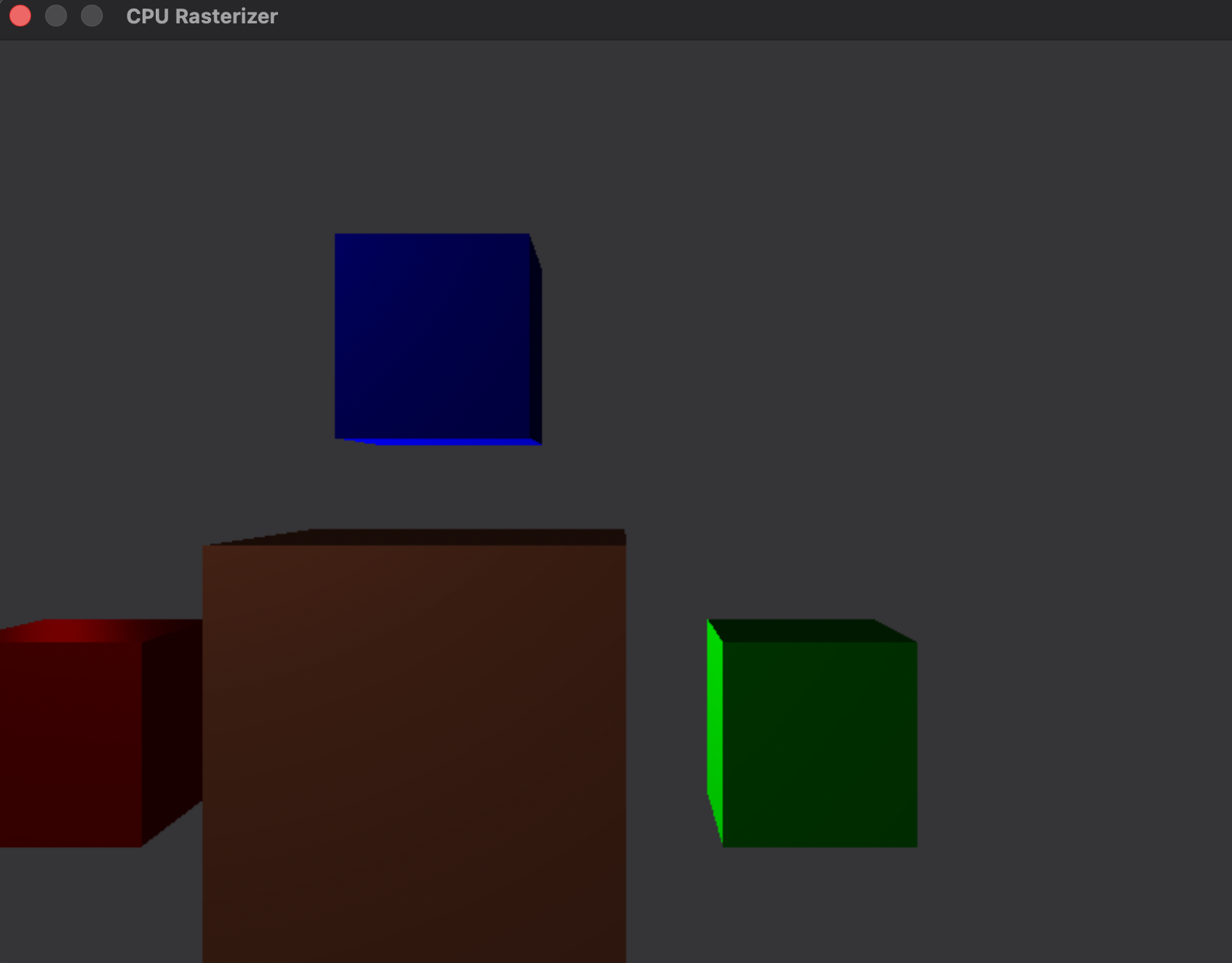
Although, the rendering is smooth now, we can see how it lags when we get closer with the camera to the objects. The reason for this might be because as we get closer we have more fragments that need to be shaded. Additionally, the triangles intersect with more tiles and they are processed as well.
There might be more ways to improve the performance here but we won’t explore that in this guide.